
SEERRAY LAB / 0.8B OCR MODEL
Xiaomi-OCR-0
Read. Parse. Understand.
Document parsing and OCR-centric understanding, together in a compact 0.8B vision-language model.

95.24Real5-OmniDocBenchOverall across five conditions
96.83OmniDocBench v1.6Overall parsing score
87.94Wild-OmniDocBenchPhysical-scene document parsing
83.2OCR-oriented VQAMean across five benchmarks
~170MOCR-centric samplesReported training corpus
01 / CAPABILITIES
Supported tasks.
Visual question answering
Key information extraction
SAMPLE PLAYBACK
Explore model outputs.
Choose a document, KIE, or VQA case to replay its saved result.
INPUT—
Choose a sample
Select one from the gallery to begin.
INPUT
The saved prompt will appear here.
MODEL OUTPUTSAVED RESULT
Select a case to play its saved response.
RECORDED SAMPLE
02 / BENCHMARKS
Evaluation results.
Document parsing and visual question answering. Select a benchmark to view the reported scores.
ACQUISITION ROBUSTNESS
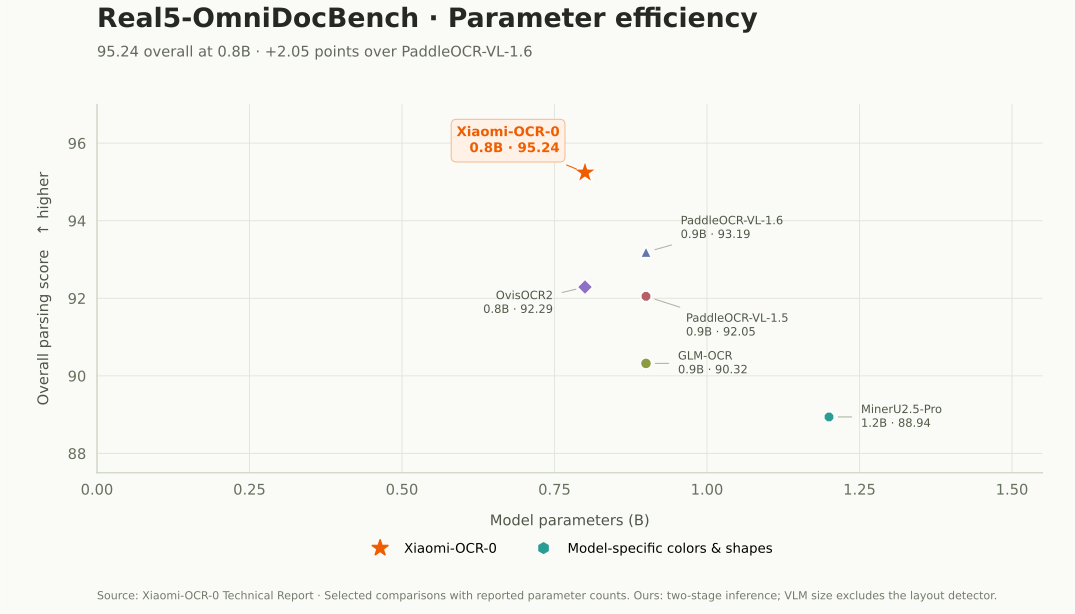
Real5-OmniDocBench
95.24
XIAOMI-OCR-0 / OVERALL SCORE
Overall score and results for five document acquisition conditions.
01
Parameter efficiency
Score at a given model size
★ Xiaomi-OCR-0Colors & shapes identify models
Hover or select a point to view its reported scores.

02
Score comparison
Overall parsing score · higher is better
MODEL DETAILS
95.24Xiaomi-OCR-0
0.8B parameters
- Scanning
- 96.41
- Warping
- 95.46
- Screen photo
- 94.47
- Illumination
- 95.39
- Skew
- 94.46
View detailed scores
| Model | Size | Overall | Scanning | Warping | Screen photo | Illumination | Skew |
|---|---|---|---|---|---|---|---|
| Xiaomi-OCR-0 | 0.8B | 95.24 | 96.41 | 95.46 | 94.47 | 95.39 | 94.46 |
| PaddleOCR-VL-1.6 | 0.9B | 93.19 | 94.74 | 92.48 | 92.78 | 93.28 | 92.66 |
| OvisOCR2 | 0.8B | 92.29 | 93.77 | 91.40 | 93.09 | 92.88 | 90.33 |
| PaddleOCR-VL-1.5 | 0.9B | 92.05 | 93.43 | 91.25 | 91.76 | 92.16 | 91.66 |
| GLM-OCR | 0.9B | 90.32 | 92.67 | 90.68 | 91.75 | 91.12 | 85.39 |
| Kimi-K2.6 | 1T | 89.76 | 90.08 | 89.62 | 89.58 | 89.91 | 89.61 |
| Gemini-3 Pro | - | 89.24 | 89.47 | 88.90 | 88.86 | 89.53 | 89.45 |
| MonkeyOCRv2-B-Parsing | 0.7B | 89.22 | 89.49 | 89.70 | 88.40 | 88.54 | 89.97 |
| Kimi K2.5 | 1T | 89.09 | 89.67 | 88.86 | 88.39 | 89.66 | 88.86 |
| Doubao-Seed-2.1-Pro | - | 89.02 | 88.85 | 89.36 | 88.99 | 89.13 | 88.79 |
| MinerU2.5-Pro | 1.2B | 88.94 | 92.11 | 88.72 | 91.29 | 91.31 | 81.26 |
| Qwen3-VL-235B | 235B | 88.90 | 89.43 | 89.99 | 89.27 | 89.27 | 86.56 |
| Gemini-2.5 Pro | - | 88.21 | 89.25 | 87.63 | 87.11 | 87.97 | 89.07 |
| MonkeyOCRv2-S-Parsing | 0.6B | 87.90 | 88.87 | 88.17 | 87.64 | 86.75 | 88.09 |
| Qwen2.5-VL-72B | 72B | 86.92 | 86.19 | 87.77 | 86.48 | 87.25 | 86.90 |
| dots.ocr | 3B | 86.38 | 86.87 | 86.01 | 87.18 | 87.57 | 84.27 |
| MinerU2.5 | 1.2B | 85.61 | 90.06 | 83.76 | 89.41 | 89.57 | 75.24 |
| PaddleOCR-VL | 0.9B | 85.54 | 92.11 | 85.97 | 82.54 | 89.61 | 77.47 |
| Nanonets-OCR-s | 3B | 84.19 | 85.52 | 83.56 | 84.86 | 85.01 | 81.98 |
| MonkeyOCR-pro-3B | 3.7B | 79.49 | 86.94 | 78.90 | 82.44 | 84.71 | 64.47 |
| GPT-5.2 | - | 78.66 | 84.43 | 76.26 | 76.75 | 80.88 | 75.00 |
| MonkeyOCR-3B | 3.7B | 78.29 | 84.65 | 77.27 | 80.71 | 83.16 | 65.67 |
| MonkeyOCR-pro-1.2B | 1.9B | 77.15 | 84.64 | 76.59 | 80.24 | 82.11 | 62.18 |
| MinerU2-VLM | 0.9B | 76.95 | 83.60 | 73.73 | 78.77 | 80.51 | 68.16 |
| DeepSeek-OCR | 3B | 73.99 | 86.17 | 67.20 | 75.31 | 78.10 | 63.01 |
| DeepSeek-OCR 2 | 3B | 73.01 | 89.59 | 66.53 | 71.65 | 76.02 | 61.28 |
| PP-StructureV3 | -- | 64.45 | 84.68 | 59.34 | 66.89 | 73.38 | 37.98 |
| Dolphin | 322M | 61.78 | 72.16 | 60.35 | 64.29 | 67.29 | 44.83 |
| Dolphin-1.5 | 0.3B | 61.48 | 83.39 | 50.50 | 69.76 | 75.61 | 28.16 |
| Marker-1.8.2 | -- | 60.10 | 70.27 | 58.98 | 63.65 | 66.31 | 41.27 |
DOCUMENT PARSING
OmniDocBench v1.6
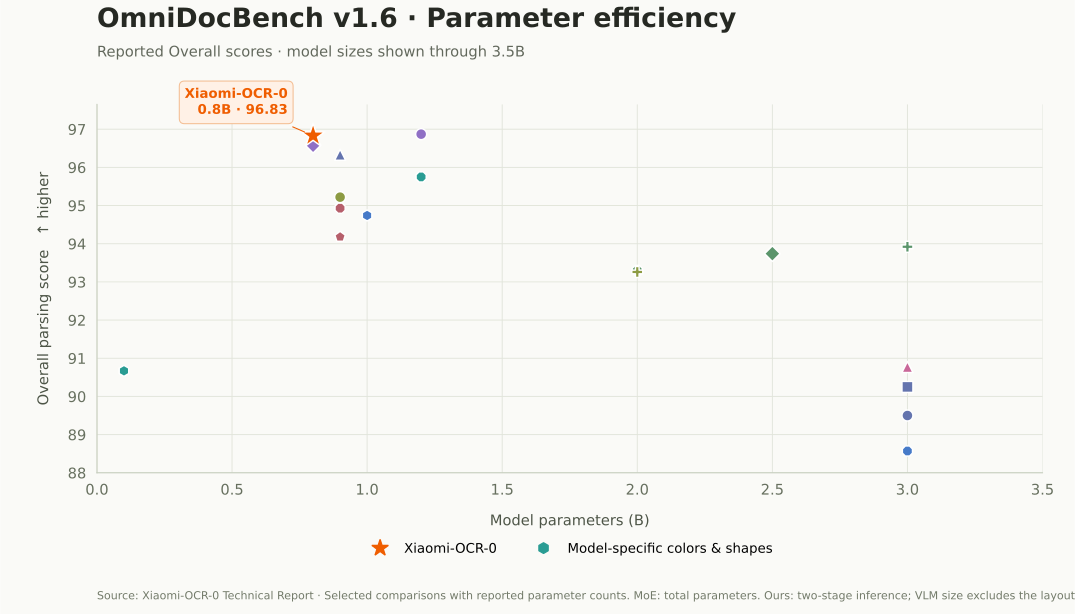
96.83
XIAOMI-OCR-0 / OVERALL SCORE
Document parsing scores, including text, tables, formulas, and reading order.
01
Parameter efficiency
Score at a given model size
★ Xiaomi-OCR-0Colors & shapes identify models
Hover or select a point to view its reported scores. Select overlapping models from the score list.

02
Score comparison
Overall parsing score · higher is better
MODEL DETAILS
96.83Xiaomi-OCR-0
0.8B parameters
- Text Edit ↓
- 0.031
- Formula CDM ↑
- 98.50
- Table TEDS ↑
- 95.11
- Reading Order Edit ↓
- 0.122
View detailed scores
| Model | Size | Overall | Text Edit ↓ | Formula CDM ↑ | Table TEDS ↑ | Table TEDS-S ↑ | Reading Order Edit ↓ |
|---|---|---|---|---|---|---|---|
| Xiaomi-OCR-0 | 0.8B | 96.83 | 0.031 | 98.50 | 95.11 | 97.19 | 0.122 |
| TeleOCR | 1.2B | 96.87 | 0.027 | 96.36 | 97.05 | 98.52 | 0.122 |
| OvisOCR2 | 0.8B | 96.58 | 0.025 | 97.53 | 94.76 | 97.16 | 0.111 |
| PaddleOCR-VL-1.6 | 0.9B | 96.33 | 0.033 | 97.49 | 94.76 | 97.11 | 0.127 |
| MinerU2.5-Pro | 1.2B | 95.75 | 0.036 | 97.45 | 93.42 | 95.92 | 0.120 |
| GLM-OCR | 0.9B | 95.22 | 0.044 | 97.18 | 92.83 | 95.39 | 0.133 |
| PaddleOCR-VL-1.5 | 0.9B | 94.93 | 0.038 | 96.89 | 91.67 | 94.37 | 0.130 |
| HunyuanOCR-1.5 | 1B | 94.74 | 0.039 | 94.50 | 93.67 | 94.71 | 0.129 |
| PaddleOCR-VL | 0.9B | 94.18 | 0.040 | 95.91 | 90.65 | 93.74 | 0.135 |
| Unlimited-OCR | 3B-A0.5B | 93.92 | 0.042 | 95.79 | 90.16 | 93.32 | 0.129 |
| Qianfan-OCR | 4B | 93.90 | 0.040 | 95.08 | 90.53 | 93.31 | 0.130 |
| Youtu-Parsing | 2.5B | 93.74 | 0.044 | 93.63 | 92.02 | 95.00 | 0.116 |
| Logics-Parsing-v2 | 4B | 93.33 | 0.041 | 95.65 | 88.42 | 91.98 | 0.137 |
| ABot-OCR | 2B | 93.30 | 0.037 | 94.86 | 88.69 | 91.87 | 0.137 |
| FireRed-OCR | 2B | 93.26 | 0.037 | 95.44 | 88.04 | 91.06 | 0.131 |
| dots.ocr | 3B | 90.77 | 0.048 | 89.95 | 87.18 | 90.58 | 0.138 |
| OpenDoc-0.1B | 0.1B | 90.67 | 0.049 | 93.02 | 83.88 | 87.45 | 0.140 |
| DeepSeek-OCR-2 | 3B | 90.25 | 0.050 | 91.84 | 83.89 | 87.75 | 0.144 |
| Dolphin-v2 | 3B | 89.50 | 0.069 | 91.01 | 84.40 | 87.44 | 0.150 |
| OCRVerse | 4B | 88.60 | 0.063 | 89.61 | 82.44 | 86.27 | 0.163 |
| MonkeyOCR-pro-3B | 3B | 88.57 | 0.074 | 88.74 | 84.35 | 88.62 | 0.189 |
| Dolphin-1.5 | 0.3B | 86.52 | 0.094 | 87.49 | 81.43 | 84.82 | 0.167 |
| olmOCR | 7B | 85.74 | 0.139 | 88.10 | 83.00 | 87.17 | 0.216 |
| Nanonets-OCR-s | 3B | 83.61 | 0.108 | 81.46 | 80.18 | 84.51 | 0.213 |
| POINTS-Reader | 3B | 83.37 | 0.096 | 85.72 | 73.98 | 77.40 | 0.198 |
PHYSICAL-SCENE ROBUSTNESS
Wild-OmniDocBench
87.94
XIAOMI-OCR-0 / OVERALL SCORE
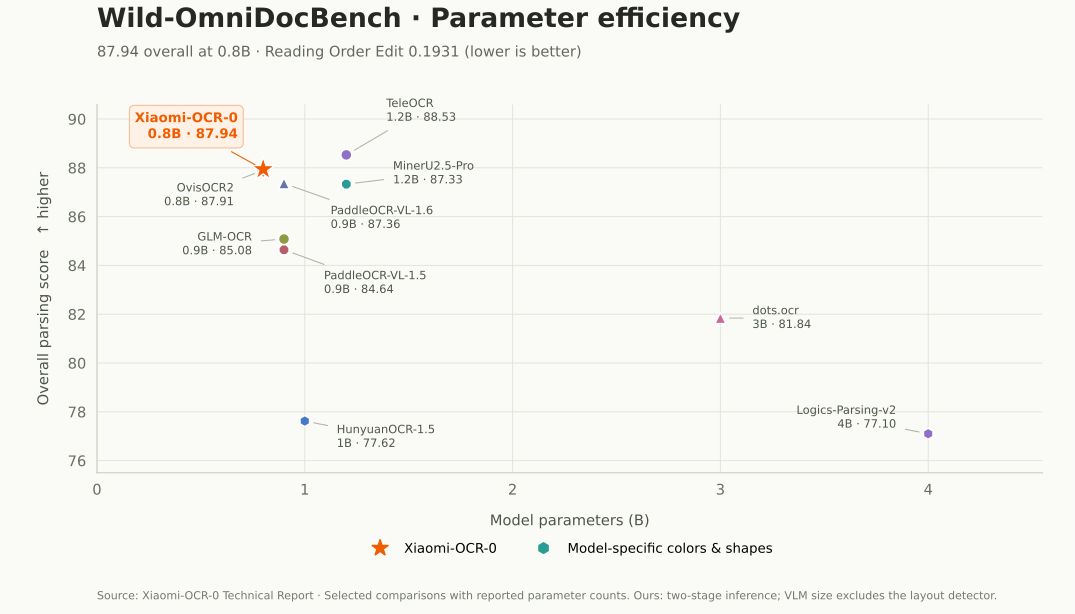
Xiaomi-OCR-0 scores 87.94 with 0.8B parameters on physically recaptured documents. Its Reading Order Edit of 0.1931 is the lowest among the methods compared in the report; TeleOCR leads overall with 88.53.
01
Parameter efficiency
Score at a given model size
★ Xiaomi-OCR-0Colors & shapes identify models
Hover or select a point to view its reported scores. Select overlapping models from the score list.

02
Score comparison
Overall parsing score · higher is better
MODEL DETAILS
87.94Xiaomi-OCR-0
0.8B parameters
- Text Edit ↓
- 0.1233
- Formula CDM ↑
- 89.55
- Table TEDS ↑
- 86.61
- Reading Order Edit ↓
- 0.1931
View detailed scores
| Model | Size | Overall | Text Edit ↓ | Formula CDM ↑ | Table TEDS ↑ | Table TEDS-S ↑ | Reading Order Edit ↓ |
|---|---|---|---|---|---|---|---|
| Xiaomi-OCR-0 | 0.8B | 87.94 | 0.1233 | 89.55 | 86.61 | 90.94 | 0.1931 |
| TeleOCR | 1.2B | 88.53 | 0.1173 | 88.26 | 89.05 | 92.14 | 0.2011 |
| OvisOCR2 | 0.8B | 87.91 | 0.1290 | 90.37 | 85.13 | 89.11 | 0.2021 |
| PaddleOCR-VL-1.6 | 0.9B | 87.36 | 0.1369 | 88.42 | 85.76 | 90.14 | 0.2057 |
| MinerU2.5-Pro | 1.2B | 87.33 | 0.1362 | 90.15 | 85.46 | 90.12 | 0.2013 |
| GLM-OCR | 0.9B | 85.08 | 0.1514 | 89.09 | 81.31 | 85.90 | 0.2228 |
| PaddleOCR-VL-1.5 | 0.9B | 84.64 | 0.1461 | 86.72 | 81.80 | 86.52 | 0.2138 |
| dots.ocr | 3B | 81.84 | 0.1483 | 85.00 | 75.32 | 80.20 | 0.2200 |
| HunyuanOCR-1.5 | 1B | 77.62 | 0.1979 | 85.12 | 67.54 | 70.67 | 0.2750 |
| Logics-Parsing-v2 | 4B | 77.10 | 0.4029 | 91.40 | 80.19 | 87.16 | 0.2355 |
VISUAL QUESTION ANSWERING
OCR-oriented VQA
83.2
XIAOMI-OCR-0 / 5-BENCHMARK MEAN
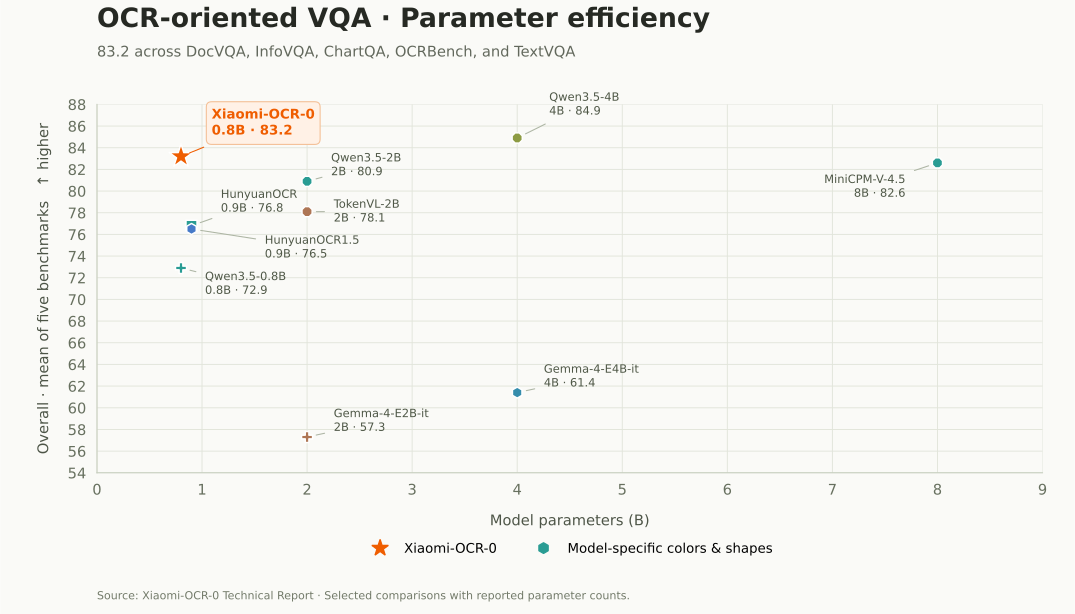
Xiaomi-OCR-0 scores 83.2 with 0.8B parameters, above every specialized OCR model in this comparison. It also exceeds Qwen3.5-2B (80.9) and MiniCPM-V-4.5 (82.6). Qwen3.5-4B scores 84.9 with five times as many parameters.
01
Parameter efficiency
Score at a given model size
★ Xiaomi-OCR-0Colors & shapes identify models
Hover or select a point to view its reported scores.

02
Score comparison
Arithmetic mean of five benchmarks · higher is better
MODEL DETAILS
83.2Xiaomi-OCR-0
0.8B parameters
- DocVQA
- 93.1
- InfoVQA
- 75.1
- ChartQA
- 84.6
- OCRBench
- 84.6
- TextVQA
- 78.6
View detailed scores
| Model | Size | DocVQA | InfoVQA | ChartQA | OCRBench | TextVQA | Overall (5-benchmark mean) |
|---|---|---|---|---|---|---|---|
| Xiaomi-OCR-0 | 0.8B | 93.1 | 75.1 | 84.6 | 84.6 | 78.6 | 83.2 |
| Qwen3.5-4B | 4B | 94.4 | 80.4 | 82.4 | 86.6 | 80.8 | 84.9 |
| MiniCPM-V-4.5 | 8B | 84.9 | 69.6 | 87.4 | 89.0 | 82.2 | 82.6 |
| Qwen3.5-2B | 2B | 92.4 | 72.4 | 77.0 | 85.9 | 76.9 | 80.9 |
| TokenVL-2B | 2B | 89.9 | 61.0 | 81.1 | 82.1 | 76.4 | 78.1 |
| GPT-5.2 | - | 91.7 | 84.0 | 57.0 | 80.7 | 72.8 | 77.2 |
| HunyuanOCR | 0.9B | 86.8 | 61.6 | 78.5 | 86.0 | 71.1 | 76.8 |
| HunyuanOCR1.5 | 0.9B | 87.6 | 55.2 | 78.3 | 86.1 | 75.1 | 76.5 |
| Qwen3.5-0.8B | 0.8B | 88.5 | 60.3 | 69.5 | 77.9 | 68.3 | 72.9 |
| Gemma-4-E4B-it | 4B | 79.2 | 47.3 | 38.4 | 76.0 | 66.1 | 61.4 |
| Gemma-4-E2B-it | 2B | 73.8 | 38.1 | 42.6 | 72.4 | 59.7 | 57.3 |
| Gemini 3.0 Pro | - | -- | -- | 57.2 | 94.0 | -- | -- |
| Mini-Monkey | 2B | 87.4 | 60.1 | 76.5 | -- | -- | -- |
| TextHawk2 | 7B | 89.6 | 67.8 | 81.4 | -- | 75.1 | -- |
Our Real5, OmniDocBench v1.6, and Wild results use two-stage inference: PP-DocLayoutV3 detects regions, then Xiaomi-OCR-0 recognizes the crops and assembles the page. The 0.8B parameter count covers the VLM and excludes the external layout detector. Scores and model sizes are from the accompanying report; each tab uses its own benchmark metric.
03 / DATA & TRAINING
Data and training.
Our automated parsing data engine supports an approximately 170M-sample OCR-centric corpus. Training builds spatial alignment, broad task coverage, and task-specific optimization.
The parsing data engine
AUTOMATED ANNOTATION PIPELINE
Targeted synthesis for remaining gaps
COVERAGE-DRIVEN + FAILURE-DRIVENUnderrepresented patterns
Rare layouts, structures, writing styles, domains, and character combinations.
Verified recurring errors
Compare model predictions with trusted annotations, then diagnose repeated failure patterns.
Both routes select a concrete generation target↓
Compose a recipe
Vary templates, text, visual style, backgrounds, and degradation to create image–annotation pairs.
Check each pair
Verify rendering and task rules, remove duplicates, and reject or regenerate invalid samples.
Train and assess
Mix accepted samples into SFT; check frozen hard cases and broader regression results.
Review samples and evaluation results to accept the recipe, adjust it, or revisit the diagnosis.
THE TRAINING RECIPE
A foundation for
reading and understanding.
Starting from Qwen3.5-0.8B.
- 1ANCHOR
Q-Mask text anchoring
Align text content with its spatial location using token and mask supervision.
- 2EXPAND
Continued pretraining
Train on document parsing and OCR-centric understanding tasks in a shared autoregressive format.
- 3OPTIMIZE
Mixed-task reinforcement learning
Optimize with verifiable task rewards using a DAPO-style objective built on GRPO.
The report also compares Mix-RL with multi-teacher on-policy distillation (MOPD) as alternative post-training methods.
04 / RESEARCH INSIGHTS
Three findings from the experiments.
Understanding benefits emerge with sufficient parsing training.
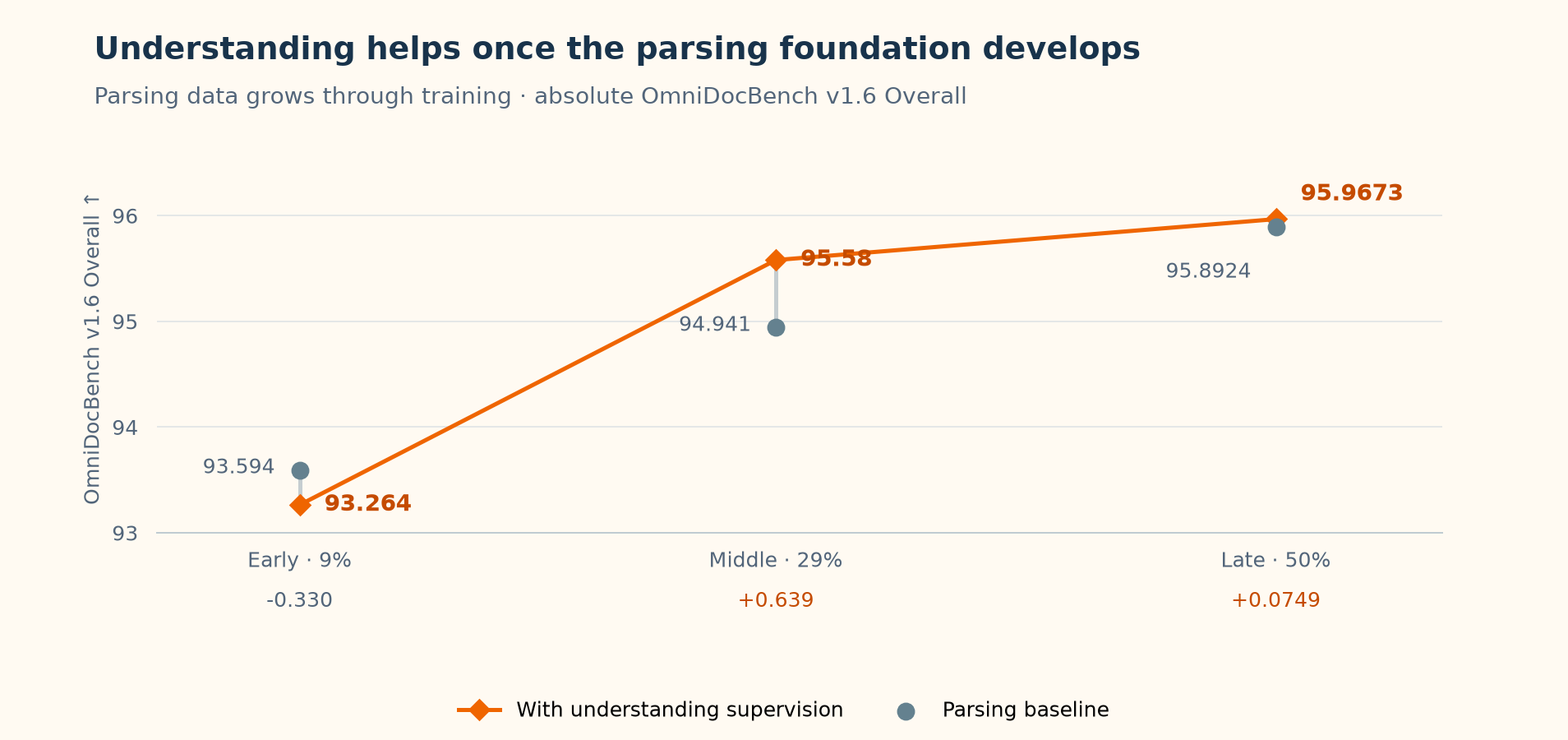
Understanding supervision hurts parsing at the early stage, but helps at the middle and late stages. Adding the same understanding pool changes Overall by -0.330 at the early stage and +0.639 at the middle stage. The late-stage ablation also shows positive transfer (+0.0749).
The stages use 9%, 29%, and 50% of all parsing data. Early training uses region-level data only. At the middle stage, page-level supervision adds +0.211 before understanding data is introduced, with about one page-level sample for every five region-level samples. The late stage keeps that ratio.
Understanding places greater demands on model capacity.
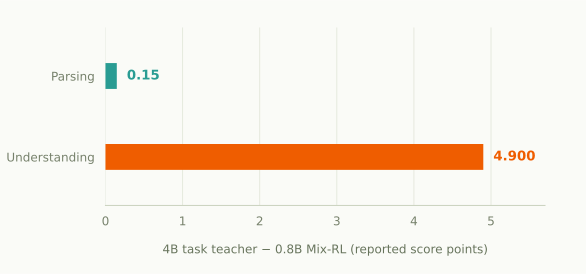
The teacher–student gap is 0.15 points on parsing and 4.9 points on understanding. Within each task, both models use the same amount of training data; each teacher specializes in one domain, while Mix-RL trains on both.
The larger understanding gap, together with emergent positive transfer, supports building a parsing foundation before placing greater emphasis on understanding.
Mix-RL and MOPD training trajectories.
● Mix-RL● MOPD
Hover or select a checkpoint to view its score and relative compute.
Hover or select a checkpoint to view its score and relative compute.
The two runs use different total compute budgets; the curves show the observed scores during training. MOPD training was stopped after monitored scores began to fluctuate.
Observed runs: Mix-RL peaks at 96.8277 on parsing and 83.264 on OCR-VQA; MOPD peaks at 96.7417 and 82.708, respectively. OCR-VQA uses the fixed five-benchmark mean.
05 / AGENT SKILL
Use OCR in your agent.
AGENT SKILL
Install from your agent.
Send this one-line instruction to your coding agent:
Read and execute https://raw.githubusercontent.com/SeerRay-Lab/Xiaomi-OCR-0/main/SKILL.md⚠️ Notice:
SETUP DETAILSGitHub repository ↗This Skill may lead your agent to download model weights, set up an SGLang or vLLM environment, and configure an MCP server. If you do not agree to this setup, do not run the command. Read the setup details on GitHub first.
skills/xiaomi-ocr/SKILL.md ↗06 / INFERENCE
Inference and evaluation.
Choose an inference path, preserve the evaluation settings, and keep the predictions needed to check each score.
INFERENCE MODES
One model, two parsing paths.
A full page in.
Markdown out.
The VLM reads the complete image and returns text, OTSL tables, and LaTeX formulas in reading order.
Page image→Xiaomi-OCR-0→Markdown
pipeline/e2e_img2md.pyLocate regions.
Recognize and assemble.
PP-DocLayoutV3 detects regions. The VLM recognizes each crop with a task prompt, then the pipeline assembles the page.
Layout→Region OCR→Assembly
pipeline/twostage_img2md.pyRead scores with their inference mode.
The headline parsing results use two-stage inference. The 0.8B size describes Xiaomi-OCR-0; it excludes the layout detector. The report also evaluates direct full-page inference.
| Benchmark | Inference | Overall ↑ | Formula CDM ↑ | Table TEDS ↑ |
|---|---|---|---|---|
| OmniDocBench v1.6 | End to end | 95.1926 | 96.4553 | 92.5325 |
| OmniDocBench v1.6 | Two stage | 96.8277 | 98.5044 | 95.1087 |
| Wild-OmniDocBench | End to end | 86.4806 | 90.0734 | 80.6184 |
| Wild-OmniDocBench | Two stage | 87.9438 | 89.5485 | 86.6129 |
BEFORE YOU START
Use the matching checkpoint and environment.
If the Xiaomi-OCR Skill has already prepared the code, runtime, and model on your machine, you can skip this setup. Otherwise, start with the GitHub code and follow the installation guide: clone the code, choose and install SGLang or vLLM, then download the model checkpoint from Hugging Face. The inference examples below assume the local model service is already running.
- Use the repository setup instructions to install the code dependencies and your chosen inference backend; start an OpenAI-compatible endpoint at
127.0.0.1:8000with model nameSeerRay-Lab/Xiaomi-OCR-0. - Download the Xiaomi-OCR-0 checkpoint from Hugging Face and configure your runtime to load its local model directory.
- For two-stage region parsing, also install PaddleX and download the PP-DocLayoutV3 layout weights as described in the repository guide. Full-page inference does not require this layout model.
Create images.jsonl with one image per line. Use absolute paths and unique filename stems, since output files are named after each input image.
{"images": ["/absolute/path/to/page-001.png"]}
{"images": ["/absolute/path/to/page-002.png"]}
RUN INFERENCE
Choose the command for your setup.
Install requirements.txt from the repository root, then use a fresh output directory for each configuration. Module invocation keeps the repository’s shared postprocessing imports available.
Full-page inference
python -m pipeline.e2e_img2md \
  --input-jsonl images.jsonl \
  --output_dir outputs/e2e \
  --served_model_name SeerRay-Lab/Xiaomi-OCR-0 \
  --port 8000 \
  --task document \
  --max_tokens 16384
Layout detection and region recognition
python -m pipeline.layout_detect_paddlex \
  --input_jsonl images.jsonl \
  --output_jsonl layout.jsonl \
  --gpu_ids 0

python -m pipeline.twostage_img2md \
  --input-jsonl images.jsonl \
  --output_dir outputs/two-stage \
  --layout-jsonl layout.jsonl \
  --served_model_name SeerRay-Lab/Xiaomi-OCR-0 \
  --port 8000 \
  --temperature 0.0 \
  --max_tokens 16384
If you already exported a PaddleX layout, skip the first command and pass its path with --layout-jsonl. Install a compatible PaddlePaddle wheel and requirements-paddlex.txt before layout detection; see the GitHub installation guide.
Prompts, OTSL, and repetition handling
The full-page and table-region prompts request OTSL for tables. OTSL is the model output format. The shared postprocessor converts tables to HTML inside the returned Markdown; MCP and the Demo apply it automatically. If repetitive-output retry is enabled, record that setting with the inference configuration and preserve the first-pass output for comparison.
Thinking is off unless --think is supplied. Context capacity must cover the image, prompt, and generated output; --max_tokens alone does not set server context capacity.
OUTPUTS
Keep the evidence behind the score.
| Output | What to keep it for |
|---|---|
*.md | One parsed document per input image, used for qualitative checks and benchmark evaluation. |
results.jsonl | Two-stage layout regions, recognition outputs, and assembled Markdown. |
primary_results.jsonl | Two-stage first-pass results when repetition retries are enabled. |
repetition_retry_report.json | Retry diagnostics; the full-page script always writes this report, while the two-stage script writes it when retries are enabled. |
postprocess/assemble_markdown.py can rebuild pages from saved region results. Preserve the assembly settings: text, formula, image, and reading-order handling can affect the evaluated output.
EVALUATION
Compare like with like.
| Benchmark | Protocol to preserve |
|---|---|
| OmniDocBench v1.6 | Official v1.6 evaluator and split; report Overall, Text Edit, Formula CDM, Table TEDS, TEDS-S, and Reading Order Edit. Record whether inference is end to end or two stage. |
| Real5-OmniDocBench | Retain the five acquisition conditions: scanning, warping, screen photo, illumination, and skew. |
| Wild-OmniDocBench | Use the physical-scene document benchmark and its matching evaluator, with the same parsing mode as the target score. |
| OCR-centric understanding | Overall is the mean of DocVQA, InfoVQA, ChartQA, OCRBench, and TextVQA on a 0–100 scale. Report Overall only when all five scores are available. |
The inspected repository provides parsing pipelines and the Agent runtime. It does not yet include a complete, pinned benchmark suite or the OCR-VQA evaluation commands. This guide documents the supported inference interface; exact score reproduction still needs those release artifacts.
Explore the reported results ↗TASK INSTRUCTIONS
Official prompts.
Document · full-page parsing
Extract all information from the main body of the document image and represent it in markdown format, ignoring headers and footers. Tables should be expressed in OTSL format, formulas in the document should be represented using LATEX format, and the parsing should be organized according to the reading order.Text, formulas, and tables
- Text
- Extract the text in the image.
- Formula
- Identify the formula in the image and represent it using LATEX format.
- Table
- Parse the table in the image into OTSL.
Key information extraction · KIE
Provide the fields you want as a JSON schema. The prompt starts with this instruction:
Extract key information in the image

Please output the key information in JSON format according to the following schema:
{
    "date": "",
    "seller_address": "",
    "seller_gst_id": "",
    "seller_name": "",
    "total_amount": "",
    "total_tax": ""
}
Replace the example keys with the fields required for your document. When using MCP, pass field names to kie_image; the service builds the prompt and cleans the JSON response.
TECHNICAL REPORT
Xiaomi-OCR-0 Technical Report
Copy the BibTeX entry to cite this work.
@misc{chen2026xiaomiocr0technicalreport,
  title={Xiaomi-OCR-0 Technical Report},
  author={Xin Chen and Anan Du and Feng Feng and Pei Fu and Jian Luan and Longwei Xu and Shaojie Zhang and Hang Li and Heng Qu and Cheng Tan},
  year={2026},
  eprint={2609.36136},
  archivePrefix={arXiv},
  primaryClass={cs.CV},
  url={https://arxiv.org/abs/2609.36136},
}